
Art printables: a complete guide to creative projects
Art printables are often dismissed as simple image downloads you fire off to your home printer in seconds. That assumption is exactly where many crafters go wrong. These digital files are, in reality, carefully constructed resources that demand proper preparation, the right paper, and attention to technical detail. Get those things right, and your finished cards, wall art, and scrapbook pages will look genuinely professional. Get them wrong, and you are left with blurry, washed-out disappointments. This guide walks you through everything you need to know, from understanding what art printables actually are, to choosing, preparing, and printing them with confidence.
Table of Contents
- What are art printables?
- How art printables differ from ordinary images
- Choosing and preparing art printables for DIY projects
- Common mistakes and expert tips for printing art printables
- Why printables deserve more respect in crafting
- Find quality art printables for your next project
- Frequently asked questions
Key Takeaways
| Point | Details |
|---|---|
| Printables are specialised files | Art printables are designed for high-quality output, unlike generic digital images. |
| File resolution is crucial | Always match your printable’s resolution and size before printing to avoid blurriness. |
| Prepare and test prints | Proper preparation and test prints are essential for professional results. |
| Common mistakes can be avoided | Most pitfalls stem from upscaling and neglecting file prep; simple checks make a big difference. |
| Expert sources elevate results | Trusted tutorials and supplies help crafters achieve the best possible outcome with printables. |
What are art printables?
Art printables are downloadable digital files designed for high-quality output in a wide range of creative projects. Unlike a casual photo you might snap on your phone, these files are built with printing in mind from the very start. Designers set the resolution, colour profile, and physical dimensions during the creation process so that the finished print looks exactly as intended.
The uses for art printables are broad and genuinely exciting for crafters:
- Card making: Decorative panels, toppers, and inserts for handmade greeting cards
- Wall décor: Botanical prints, typographic quotes, and illustrated artwork for framing
- Invitations and stationery: Birthdays, weddings, and celebrations
- Scrapbooking: Coordinated backgrounds, journalling cards, and embellishments
- Gift wrapping and tags: Personalised touches for presents
The popularity of home crafting has surged considerably over the past few years. Searches for digital craft downloads have grown year on year as more people discover the satisfaction of making things by hand without needing specialist equipment beyond a home printer. For anyone interested in card making supplies and ready-to-use design kits, the range available online today is remarkable.
What makes art printables particularly appealing is accessibility. You do not need a design background to use them. You download the file, prepare it correctly, and print. The hard creative work has already been done for you. Your job is to bring it to life on paper, which is a skill in itself and one worth developing properly.
How art printables differ from ordinary images
Understanding the difference between a printable art file and an ordinary digital image is genuinely one of the most useful things a crafter can learn. It changes the way you select files and sets realistic expectations for your results.
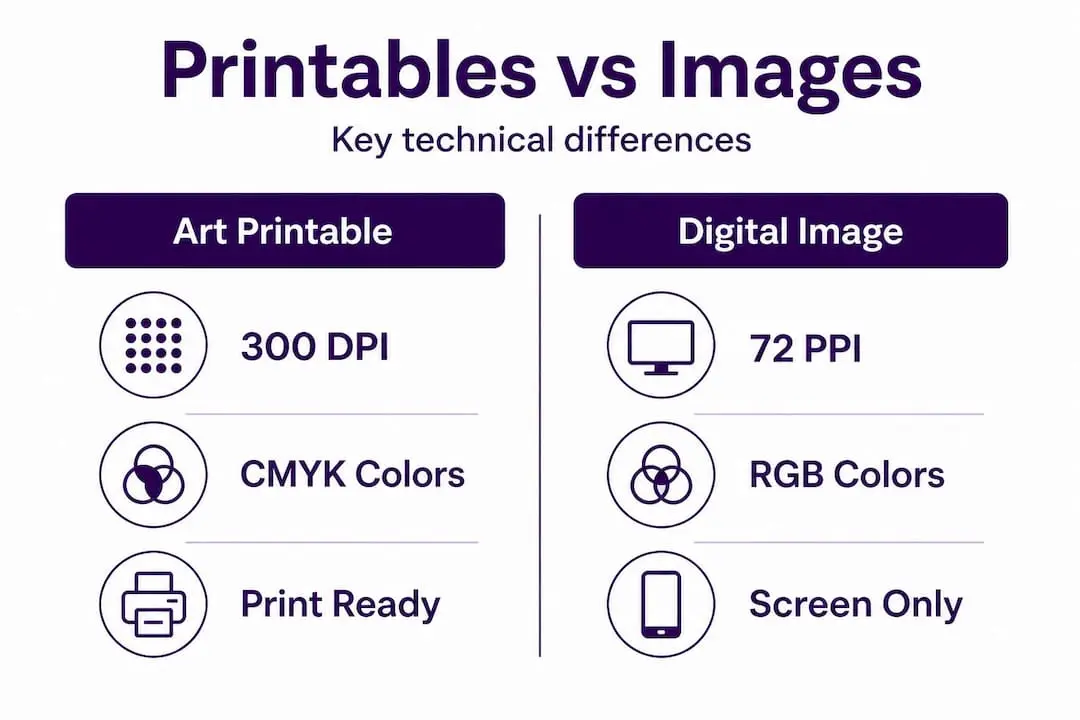
An ordinary digital image, such as a JPEG photo you find online, is optimised for screens. It is typically 72 pixels per inch (PPI), which looks perfectly sharp on your monitor but produces a soft, pixelated result when printed at full size. Art printables, on the other hand, are usually created at 300 dots per inch (DPI) or higher, which is the standard threshold for sharp, clean printed output.
“Treat printable art like a prepress job. Start with the right master file, set the size correctly, and do a test print before producing multiple copies.” This is the standard expert guidance for anyone serious about quality printable crafts.
Here is a direct comparison of the two to make the differences clear:
| Feature | Art printable | Ordinary digital image |
|---|---|---|
| Resolution | 300 DPI or higher | Typically 72 PPI |
| Physical size | Pre-specified by designer | Rarely defined |
| Colour profile | CMYK or print-optimised RGB | Screen-based sRGB |
| File format | PDF, TIFF, or high-res JPEG | JPEG, PNG, WEBP |
| Print quality | Consistently sharp | Variable and often poor |
| Intended use | Paper printing | Screen display |
The colour profile point is worth dwelling on. Screens display colours using light (RGB), while printers mix inks (CMYK). A printable file prepared in a print-optimised colour profile will reproduce colours far more faithfully on paper. A screen image often shifts in tone unexpectedly when printed, because the conversion has not been accounted for.
Upscaling low-resolution files leads directly to blurring, so preparing files for their physical output size is absolutely essential. This means you should never take an art printable designed for an A6 card and stretch it to A4 without expecting a significant drop in quality. Buy or download the size you need from the start, and you will avoid a great deal of frustration.
The key practical differences to remember are:
- Resolution is everything when it comes to sharpness on paper
- File format matters, with PDF and TIFF generally outperforming low-quality JPEGs for printing
- Colour shifts are common when printing screen-optimised files
- Size is fixed at creation; rescaling upward always reduces quality
When you buy printable art from a reputable source, these technical foundations are already taken care of by the designer. Your role is to respect those parameters when you prepare and print the file.
Choosing and preparing art printables for DIY projects
Selecting the right printable is not simply about picking a design you like. The practical side matters just as much as the aesthetic. Here is a straightforward process for choosing and preparing your files so that every project delivers the result you are hoping for.
Starting with the right master file, setting the size correctly, and doing a test print before producing multiple copies is the single best piece of advice for any crafter working with printables. Follow these steps to make it happen:
- Identify your project requirements. Decide on the finished size, paper type, and how the piece will be used before you search for a design. A card topper needs different dimensions to a framed wall print.
- Download the file and check its resolution. Open the file in a PDF viewer or image editor and confirm it is 300 DPI at the intended print size. Most reputable download platforms include this information in the product description.
- Set up your printer correctly. Select the paper size, print quality (always choose the highest available for art prints), and ensure you are not printing in draft mode.
- Avoid ‘fit to page’ settings. This is one of the most common errors. Letting your printer software scale the design to fill the page often distorts proportions and can reduce sharpness.
- Do a test print on plain paper first. Check the size, layout, and colour accuracy before committing to your best card stock or photo paper.
- Print your final copy on the appropriate paper once you are satisfied with the test result.
Pro Tip: If your test print looks slightly darker or more saturated than the design on screen, adjust your printer’s colour density settings rather than editing the original file. This preserves the integrity of the design.
Paper choice is a significant factor that many crafters overlook. Here is a quick reference for common project types:
| Project type | Recommended paper | Weight | Finish |
|---|---|---|---|
| Greeting cards and toppers | Card stock | 200 gsm to 300 gsm | Matte or silk |
| Framed wall art | Photo paper or fine art paper | 180 gsm to 250 gsm | Matte or lustre |
| Scrapbooking backgrounds | Smooth white paper | 120 gsm to 160 gsm | Matte |
| Gift tags and labels | Label stock or card | 160 gsm to 200 gsm | Matte |
| Invitations | Premium inkjet paper | 180 gsm to 220 gsm | Silk or satin |
You can find a wealth of project tutorials that pair specific printable designs with paper recommendations, which takes the guesswork out of the process entirely. Following a tutorial for your first few projects is an excellent way to build confidence before experimenting independently.
Common mistakes and expert tips for printing art printables
Even crafters with years of experience make avoidable errors when it comes to printing. Knowing where things typically go wrong means you can sidestep these issues before they cost you time, paper, and ink.
The top mistakes to avoid:
- Upscaling files beyond their designed size. This is the number one cause of blurry prints. If a file is designed at A5, print it at A5.
- Skipping the test print. Many crafters go straight to their best paper and then regret it. A quick test on plain printer paper takes two minutes and can save an entire sheet of expensive card stock.
- Ignoring colour calibration. If your printer has not been calibrated recently, or if you are using third-party inks, colours can shift noticeably. Run a nozzle check and alignment test before important print runs.
- Using the wrong print quality setting. Draft mode uses less ink and produces visibly inferior results. Always use best or photo quality for art printables.
- Not checking bleed and trim lines. Many printable files include a small bleed area (extra space beyond the cut line) to prevent white edges after trimming. Cutting inside the trim line rather than on it gives you a clean finished edge.
“Resolution at final physical size matters more than screen appearance.” This reminder is worth sticking above your crafting desk. A design that looks stunning at full screen size on your monitor may print softly if the underlying resolution does not support the physical dimensions.
Careful file prep and test printing are vital to avoiding blurring and disappointment. These are not optional steps for perfectionists. They are simply good practice for anyone who wants consistent, professional-looking results.
Pro Tip: When troubleshooting blurry prints, first check whether the issue is in the file itself or in the printer settings. Open the file at 100% zoom in your PDF viewer. If it looks sharp on screen at that zoom level, the problem is almost certainly a printer setting, not the file.
A quick checklist for crisp, professional prints:
- Confirm file resolution is 300 DPI at your chosen print size
- Select the correct paper size in your printer dialogue
- Choose highest quality print setting
- Turn off ‘fit to page’ or ‘scale to fit’ options
- Run a test print on plain paper
- Check colour accuracy before printing on premium stock
- Use scissors or a craft knife and cutting mat for clean, straight edges when trimming
Keeping a log of your printer settings for different paper types is genuinely useful. Once you find a combination that works beautifully, write it down. You will thank yourself when you return to a project months later and need to reproduce the same quality. You can find craft supplies for printables including cutting tools and specialist papers that make the finishing process that much easier.
Why printables deserve more respect in crafting
There is a persistent perception in some crafting circles that printables are a shortcut, a way of avoiding the real work. Having spent time understanding what actually goes into producing and printing these files well, that view seems quite unfair.
The technical side of art printables is legitimately demanding. Designers who create quality printable files are managing colour science, resolution mathematics, paper compatibility, and aesthetic composition simultaneously. The knowledge required to produce a file that prints beautifully at A4 and also works as an A6 card topper is not trivial. When crafters treat that work casually, they undermine the quality of their own projects.
The crafters who consistently get the best results from printables are the ones who treat them with the same respect they give to traditional media. They prepare carefully, test thoroughly, and choose their materials thoughtfully. They browse craft downloads with clear project requirements in mind rather than grabbing whatever looks appealing and hoping for the best.
There is also a broader point worth making about accessibility. Art printables genuinely democratise creative production. Someone with a home printer, a modest budget, and a willingness to learn proper technique can produce finished pieces that would not look out of place in a craft fair or gift shop. That is a remarkable thing. The gap between amateur and professional output has narrowed significantly because quality printable design is available at low cost. The limiting factor, in most cases, is no longer access to good design. It is the commitment to preparing and printing it correctly.
Invest the time to understand your printer, choose the right paper, and follow best practice with every project. The results will consistently exceed what most people expect from a home-printed file.
Find quality art printables for your next project
You now have a solid understanding of what makes art printables work, how they differ from ordinary images, and how to prepare and print them for the best possible results.
Craftsuprint brings together thousands of expertly prepared card making downloads, printable kits, and themed design collections, all created by independent designers who understand what crafters actually need. Every file is built for printing, so the technical groundwork is already done. Whether you are making greeting cards, decorating your home, or building a scrapbook album, you will find designs that are ready to download, prepare, and print with confidence. Explore the full range of tutorials, supplies, and downloads to bring your next creative project to life with the professional finish it deserves.
Frequently asked questions
Can I use art printables for commercial projects?
Some printables are for personal use only, while others allow commercial use; always check the licence before selling items made with them.
Why does my printed art look blurry?
Blurriness often results from upscaling low-resolution files or using incorrect printer settings; ensure your file matches the intended print size for best results.
What paper should I use for art printables?
Choose paper that matches your project; matte card stock for handmade cards, glossy or lustre photo paper for framed prints, and heavier weights for durability. Always do a test print before your final run.
How do I download and print a digital art file?
Download the file, check its resolution and physical size, configure your printer settings to match, run a test print on plain paper, and then produce your final copies on your chosen stock once you are satisfied with the result.